
Why use Memberstack?
Memberstack is a powerful no-code tool that enables you to easily Memberstack is a secure tool that complies with GDPR standards. It utilizes Stripe for payment processing, ensuring adherence to European security and data management regulations as a certified Level 1 PCI Service Provider.
. With Memberstack, you can restrict access to certain pages, allowing only registered members to log in using their username and password. This comprehensive tool is particularly well-suited for creating membership spaces in Webflow.
You can use it to build various platforms, including e-learning sites, marketplaces, and access-controlled tools or features.
How does Memberstack work?
Authentication System
Memberstack allows you to configure member logins using email addresses, passwords, custom fields, and social media authentication.

Payment System
You can monetize membership access by integrating Memberstack with payment solutions like Stripe Additionally, Memberstack provides an API to connect with other payment solutions.

Interface Customization
You can customize the user interface either through the platform or by adding custom code.

Administrator
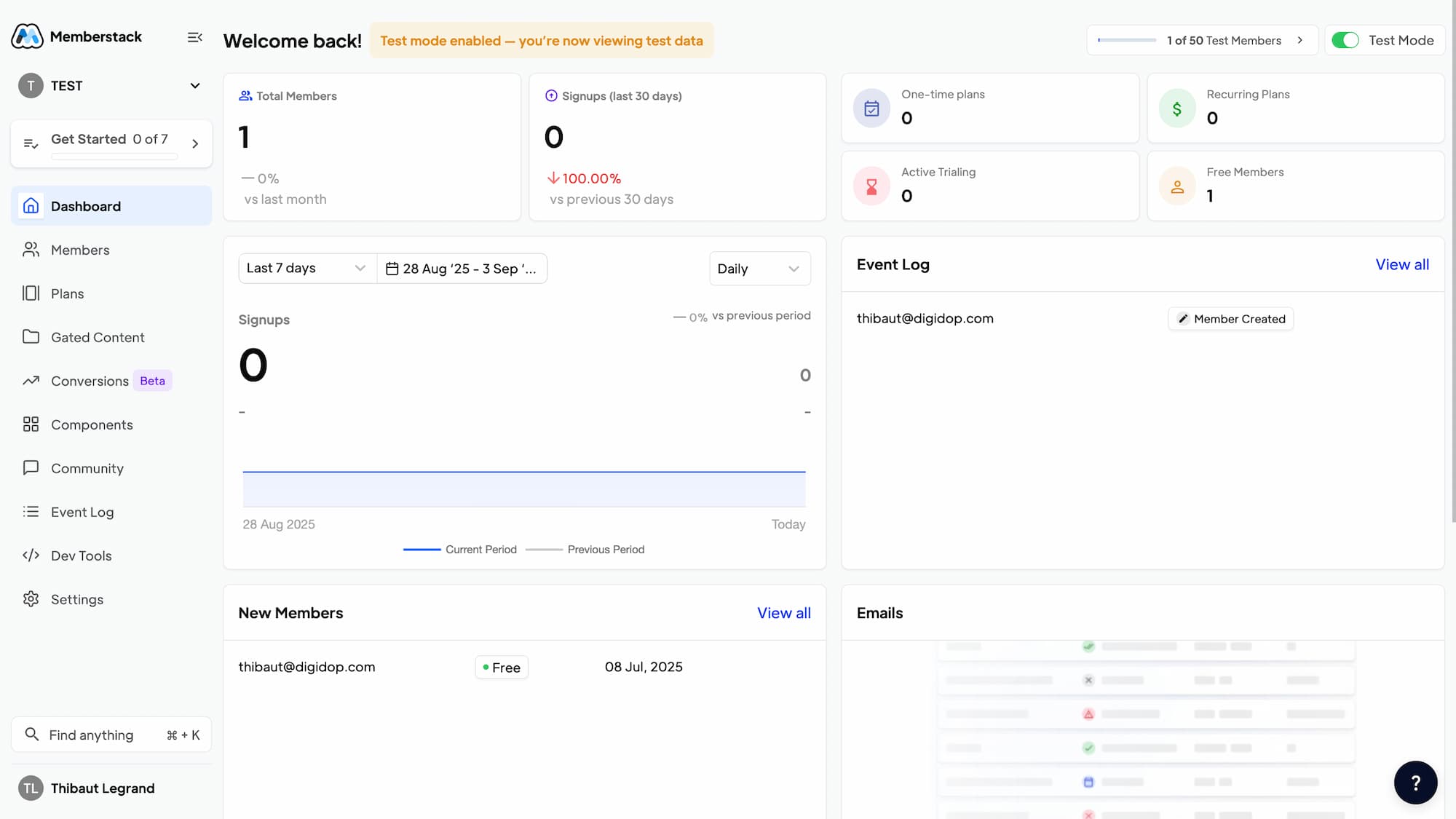
This no-code tool includes an admin interface that allows you to easily manage client accounts, handle access permissions, create new offers, and more.

Technologies and Integrations
Memberstack is compatible with a range of no-code, low-code, or coded technologies, including:
- Webflow
- React
- Vue
- Jamstack
- Next.js
- WordPress
You can also connect Memberstack to many no-code tools:

This flexibility allows you to connect Memberstack with your website technology and optimize your member management processes through various workflows.
Developer Space
Memberstack also caters to developers with a dedicated low-code interface, enabling further customization of the tool's integration on your site.

Security and GDPR
Memberstack is a secure tool that complies with GDPR standards. It utilizes Stripe for payment processing, ensuring adherence to European security and data management regulations as a certified Level 1 PCI Service Provider.

Memberstack and Webflow
Whether for designing the membership space, configuring the login interface, or managing data flows, Memberstack is specifically designed to work seamlessly with Webflow.

Conclusion on the Tool
Memberstack Advantages
- User-friendly interface
- Comprehensive membership features
- Compatibility with numerous no-code tools
- High customization options
Memberstack Disadvantages
- Not a native tool for Webflow
Summary
- No-code platform for integrating membership and payment features into your website
- Seamless Webflow integration and compatibility with other popular web platforms
- Secure authentication with social logins and comprehensive member management
- Integrated payment system via Stripe for recurring subscriptions and one-time payments
- Gated content with granular access control by membership level
- Scalable pricing from $14 to $249/month based on member count
- Unlimited free trial until your site launch
Turn Your Website Into a Profitable Membership Platform
Memberstack is revolutionizing membership site creation in 2025. This no-code solution empowers content creators, web agencies, and entrepreneurs to monetize their audiences without complex technical development. The tool transforms any website into a secure membership platform with integrated payment processing.
Memberstack's strength lies in its ability to seamlessly integrate with existing platforms, especially Webflow, while maintaining complete design control. Companies like Slack, American Airlines, and over 3,000 organizations use Memberstack to manage millions of members daily. The platform serves online course creators, private communities, simple SaaS applications, and premium content sites looking to build an economy around their expertise.
How does Memberstack work?
Memberstack functions as an authentication and payment layer that overlays your existing site. Integration happens through custom HTML attributes added directly in your web editor, requiring no server-side code.
The secure authentication system allows members to log in via email/password or social accounts (Google, Facebook, GitHub). Once logged in, users access their personalized dashboard where they manage profiles, subscriptions, and billing information. The tool uses Stripe as the primary payment processor, ensuring transaction security and PCI Level 1 compliance.
The gated content functionality lets you lock pages, sections, or specific elements based on membership levels. You precisely define who can access what, creating different subscription tiers with exclusive content for each level.
The centralized admin interface streamlines member management, promotional offer creation, and performance tracking. Webhooks and APIs enable integration with third-party tools like Make, Zapier, Mailchimp, or Airtable for workflow automation.
Key Features:
- Email or social login authentication
- Integrated Stripe payment system
- Granular content protection
- Customizable member dashboards
- Complete admin interface
- APIs and webhooks for integrations
- Automated transactional emails
- Recurring subscription management
- Multi-currency support
- Pre-built Webflow components
Authentication System
Memberstack allows you to configure member logins using email addresses, passwords, custom fields, and social media authentication.
Payment System
You can monetize membership access by integrating Memberstack with payment solutions like Stripe Additionally, Memberstack provides an API to connect with other payment solutions.
Interface Customization
You can customize the user interface either through the platform or by adding custom code.
Administrator
This no-code tool includes an admin interface that allows you to easily manage client accounts, handle access permissions, create new offers, and more.
Technologies and Integrations
Memberstack is compatible with a range of no-code, low-code, or coded technologies, including:
- Webflow
- React
- Vue
- Jamstack
- Next.js
- WordPress
You can also connect Memberstack to many no-code tools:
This flexibility allows you to connect Memberstack with your website technology and optimize your member management processes through various workflows.
Developer Space
Memberstack also caters to developers with a dedicated low-code interface, enabling further customization of the tool's integration on your site.
Security and GDPR
Memberstack is a secure tool that complies with GDPR standards. It utilizes Stripe for payment processing, ensuring adherence to European security and data management regulations as a certified Level 1 PCI Service Provider.
Our Take on Memberstack
Memberstack stands as the go-to solution for creating membership sites on Webflow in 2025. The tool excels through its implementation simplicity and customization flexibility. Unlike rigid market solutions, Memberstack completely preserves your creative freedom.
The scalable pricing with unlimited free trial represents a major advantage for testing all features before launch. Extensive documentation and active community support via Slack facilitate onboarding, even for no-code beginners.
The recent version 2.0 significantly improved user experience with a modernized admin interface, new integrations, and optimized performance. Real-world use cases are impressive: Master The Handpan generated over $2M in recurring revenue, while Makerpad (sold to Zapier) built its entire educational platform with this stack.
Limitations primarily concern transaction fees on basic plans (up to 4%) and dependency on third-party services like Stripe. For highly complex business logic, a custom-developed solution might offer more flexibility.
Memberstack Pros and Cons
✅ Strengths
- Intuitive no-code integration: Add membership features with simple HTML attributes, no development required
- Complete design customization: Total creative freedom in Webflow with all visual components
- Rich ecosystem: 19+ native integrations and support for popular automation tools
- Enterprise security: PCI Level 1 certification, SSL encryption, native GDPR compliance
- Exceptional customer support: Active Slack community, detailed documentation, responsive team
❌ Weaknesses
- High transaction fees: Up to 4% on Basic plan, impacting small volume profitability
- External dependency: Completely relies on Stripe for payments, limiting alternatives
- Limited CRM features: Requires third-party integrations for advanced customer management needs
Frequently Asked Questions About Memberstack
What does Memberstack cost in 2025?
Memberstack offers 4 pricing tiers with 2025 promotional codes: Basic at $14/month (1,000 members, 4% fees), Professional at $24/month (5,000 members, 2% fees), Business at $49/month (10,000+ members, 0.9% fees), and Established at $249/month (unlimited members, 0% fees). The free trial is unlimited until launch.
Is Memberstack beginner-friendly?
Memberstack excels in simplicity through its no-code approach. Integration requires only adding custom HTML attributes in your editor. Extensive documentation, pre-built components, and active Slack community greatly facilitate onboarding, even without technical knowledge.
What are the best Memberstack alternatives?
Key alternatives include MemberSpace (more platform flexibility), Podia (education focus), Kajabi (all-in-one marketing), and for Webflow specifically, the new native Webflow Memberships. Choice depends on your budget, functional needs, and primary web platform.
Memberstack Alternatives
MemberSpace positions itself as the most versatile alternative with multi-platform support (not just Webflow). The tool offers similar features but with a more flexible approach for custom integrations and a pricing system based solely on monthly subscription without transaction fees.
Podia specifically targets educational content creators with native course creation features, integrated email marketing, and community tools. This all-in-one alternative suits entrepreneurs wanting a complete solution without multiple tools, though it offers less design flexibility than Memberstack.
For Webflow users, Webflow Memberships (beta version) represents the official native alternative. While less mature than Memberstack, this integrated solution might appeal through its simplicity and absence of third-party costs. However, features remain limited compared to Memberstack's rich ecosystem and depreciated in a short future.
Kajabi serves entrepreneurs building complete educational businesses with marketing automation, landing pages, and integrated customer management. This premium alternative costs more but replaces several specialized tools, justifying the investment for large-scale projects requiring a complete marketing ecosystem.
Maximize Your Membership Site Potential with Memberstack
Memberstack particularly excels for premium content creators, web agencies, and no-code entrepreneurs using Webflow. The tool perfectly suits online courses, private communities, simple SaaS applications, and gated content sites requiring quick monetization without technical development.
To optimize results, start with the unlimited free trial to test all features with your real audience. Plan your membership architecture by clearly defining access levels and exclusive content before implementation. Integration with automation tools will streamline workflows and enhance member experience.
Sources and Resources
Sources: Official Memberstack Site - G2 User Reviews - Memberstack Documentation
